Category

Tech

Category

When it comes to digital marketing, imagery is key. People forget much of what they read. But they can remember images that they’ve seen only once, for many years after their exposure to that image.

In the age of internet marketing, a big emphasis is put on high-quality images. Companies want their content to look crisp and clean.

Pixelation is often the result of low-quality imagery. And while that is often the case, there’s also a time when image pixelation is ideal.

Wondering how to pixelate an image and why you would ever want to pixelate an image? Keep reading below to learn more about pixelating an image today.

Why Pixelate an Image

There are certain times when pixelating a high-quality image makes sense.

For one, it can be a great way to blur out part of an image. For example, if the image contains sensitive information, like a license plate number, a phone number, or an address, you can pixelate part of the image to blur that section out.

Depending on the level of pixelation added, you can make the content unrecognizable and thus safe to share the image with others. Likewise, you can do this if a photo contains any indecency or vulgar text.

Other times, you may want to pixelate an entire image to add a vintage look to it. Depending on your goals for an image or marketing campaign, pixelating an image can make it look like it came from an 80s video game, which is very much in trend right now.

You can also use tools to segment images automatically, based on the objects in an image. Image segmentation by SentiSight.ai can locate objects within an image on a pixel by pixel level, whether the image is high quality or already pixelated.

How to Pixelate an Image

Here are some image pixelation tips for those trying to make a high-quality image look pixelized.

If you have a Windows computer, then you should have the Paint 3D app (formerly Microsoft Paint). There is a simple tool you can use in this app to pixelate all or part of an image.

First, import your image into the editor. Using the select tool, choose the area you would like to pixelate. Once selected, drag the selection box down, lowering the size of your selection until it’s quite tiny.

Click elsewhere on your screen to deselect the tiny image selection. This will reduce the quality of that selection, pixelating the image.

Then, click the selection again, and drag the corner to return it to its original size, covering the leftover whitespace. You’ll now see your selection as pixelated while the remaining image is the same.

If you don’t have a Windows computer or just want to use a browser-based tool, you can visit websites like gimp.com or onlineimagetools.com.

Import your image. Make a selection of a part of the image, or the entire image.

Choose the size of your pixels, which is essentially the level of pixelation. Then download your freshly pixelated image.

Start Pixelating Today

Hopefully, our image pixelation guide has taught you how to pixelate an image the easy way. Using free tools, you can pixelate all or part of an image in seconds.

Looking for more graphic design tips like this? Visit our blog now to keep reading.

The home entertainment sector has changed and is currently one of the fastest growing most spoken and written about aspects of our time. Smart tech is the way of the future and as such it is important to know as much as you can about the current trends, tech needs and possibilities for the entire family.

The Big Screen

Every family needs the smart television to be able to watch the big game or the family Friday night movie. This is generally the centerpiece of the smart home entertainment set up in the sense that its where the entertainment will be accessed and enjoyed from. Ensure that it’s quality that will last you and be able to put up with all the hands and high levels of usage that family entertainment will demand of it.

Sound

There can be no home entertainment without decent sound. Whether it’s surround sound speakers or in-ear pods. In fact, many homes have a mix of all of these sound aspects, and they are used in different circumstances. So, when there is the need for privacy and in-room entertainment that the family does on its own and in a personal sense then earphones and ear pods are needed and again family games night will need the best surround sound that you have. 

Personal tech

There is then personal technology that you will need to keep in touch with friends and family as well as to keep your social media updated. This is tech such as tablets, smart phones and any hand-held consoles. A great example is the new Lenovo Childrens Tablet range that  manages to mix usability with toughness, making for a great personal technology that you must consider as a component of the in-home entertainment set up.

The smart connected speaker

Yes, some may call it the personal home assistant or Alexa/Google but it’s a common feature of the modern home and is used to connect and integrate the smart home tech that you have in place. It allows everyone to chance to listen to their own music and can be a wealth of information and service advice.

A safety protocol

It may not sound very entertaining, but the fact that we access most entertainment online and in the cloud means that we need to be sure of our protection when we are doing this. There thus needs to be a strict and clear privacy and security protocol that is observed by all who access the home entertainment hub.

These are the simple must haves and there will be many a smart home that has a lot more than this for home entertainment. The aim should be to have what the family needs and no more, if you’re not using it but have it piled up in the home, then you’re not making the most of the equipment you have – a waste given how expensive home entertainment can be. Keep it simple and ensure that the family are involved in determining what you need in the home to keep everyone happy.

When it comes to cyberattacks, many believe that it’s something that only happens to celebrities and big corporations. However, reports show that 43 percent of cyberattacks target small businesses.

In fact, small business cybersecurity is an increasing concern in the midst of Russia’s invasion of Ukraine. If you look at it from the perpetrator’s point of view, small businesses are much easier targets. They generally lack cybersecurity basics like a smaller budget and lack an IT staff to protect themselves from online attacks.

If you have a small business, keep reading to learn how you can improve your business’s cybersecurity with methods, tips and other advice.

Understanding Common Cyberattacks for Increased Small Business Cybersecurity

There are many kinds of cyberattacks, and they’re constantly evolving to evade even the best cybersecurity methods. The best way to defend your small business is by understanding the most common types of cyberattacks.

These include:

  • Phishing
  • Malware
  • Viruses
  • Ransomware

Phishing is a type of cyberattack that tricks members of your business into clicking malicious links. These links often appear to be authentic and seem to come from a legitimate source.

However, clicking the link infects the device with malware that allows cybercriminals to steal sensitive information. Phishing also includes other types of social engineering, such as phone calls to get individuals to disclose otherwise sensitive information.

Malware is an umbrella term for any type of software with a direct objective of damaging your server, network, device or client. Phishing is included under this umbrella term, as well as viruses and ransomware.

Viruses have the goal of infecting a device to leave a system vulnerable. Ransomware operates like a virus but is generally delivered like a phishing scam through an email. Without proper cybersecurity protocols, it will hold a system hostage until the ransom is paid.

Business Cybersecurity Tips

Once you have a solid understanding of the various types of cyberattacks, you must have a plan in place containing small business cybersecurity advice and protocols.

1. Employ Security-Conscious Employee Training

Cybersecurity works best when everyone works as a team. That means all employees should be trained to be security-conscious. This includes:

  • Creating strong passwords that are reset regularly
  • Being aware of red flags that indicate a phishing email or if a file may be malicious
  • Protocols that let employees know what to do in the event a phishing email or a malicious file is discovered
  • Keeping devices, browsers and software up to date

Additionally, small businesses should follow FCC guidelines on handling customer data and internet use.

2. Use Antivirus and Security Software

One of the most important weapons for a small business is to use the right antivirus and security software. Antivirus software is generally expensive, but it doesn’t have to be. You can use a Microsoft Defender, which is free for Windows and security software like Certus data erasing.

3. Back up Files and Secure Wi-Fi Networks

Even with complex cybersecurity protocols in place, criminals can still compromise your data. Consider using backup programs to help mitigate the risk of any stolen, deleted or compromised data.

You can even find programs that back up data on a schedule or automatically in the event you forget. Once you back up your files, ensure that you keep a copy offline just in case. Lastly, you must always secure, encrypt and hide your business’ Wi-Fi, and your router must be password protected.

Protecting Your Small Business

Small business cybersecurity is to be taken seriously. Although it may seem more profitable for criminals to target larger corporations and companies, the lack of cybersecurity protocols and the ease of penetrating a system makes small businesses a much easier target.

If you find this post helpful, check out some of our other recent blogs for more cybersecurity tips!

Did you know that PDFs are the third most popular file format on the internet? The IronPDF library helps incorporate the thriving format in software development.

Are you a current IronPDF user or someone looking for new PDF libraries? Do you need help learning your way around IronPDF?

The following guide will explain how the library works and all of its features. Read on and learn why IronPDF is a developer’s dream.

What Is IronPDF?

IronPDF is a library that offers ways to make, manipulate and print PDFs in .NET and .NET Core. It’s an essential tool for software engineers using C#. It’s very similar to GemBox PDF and other PDF alternatives.

The handy library uses a .NET Chromium engine that renders HTML pages to PDF files. It eliminates the need to use confusing APIs to position or design PDFs. IronPDF supports everyday online documents such as ASPX, HTML, CSS, JS, and images.

IronPDF also allows users to make a .NET PDF library by utilizing CSS, HTML5, Javascript, and images. Users can easily stamp, edit, and add footers and headers to their PDFs. Additionally, it makes reading PDF text and extracting images simple.

Key Features

IronPDF users can make PDF documents from HTML 4 and 5, CSS, and JavaScript. They can also create PDF documents from URL. The URLs can include custom login credentials, user agents, proxies, cookies, and HTML headers.

The library allows users to read and fill PDF form-field data and extract images and text from PDFs. Users can stamp new HTML content onto any current page that they want. They can also add logical or HTML headers and footers and digitally sign.

IronPDF lets users load and parse their existing documents. They can merge and split the content in their documents. Users can also add headers, footers, bookmarks, watermarks, annotations, assets, and text.

Converting Formats and Printing

IronPDF lets users convert ASPX WebForms using only 3 lines of code. It converts ASP.NET webforms to PDFs for download. Then, users can view the PDFs in the browser.

The custom ‘base URL’ in IronPDF offers access to asset files all over the web. Responsive layouts via Virtual Viewport use HTML encoded in any typical file encoding.

IronPDF users can save and load from binary data, files, or MemoryStreams. They can also screen or print CSS types of media from the library.

IronPDF even converts PDF files into PrintDocument objects. This means that users can print without having to use Adobe. Users can export authorized log files containing details about API success and debug errors.

Ready to Try IronPDF?

Now you know that IronPDF is loaded with helpful features and stands out among other digital libraries. Its customization of PDFs and flexibility gives its users great control. It also offers a simple way to create PDFs from scratch.

We hope this guide has helped you navigate the IronPDF library and gain all of its benefits. Check out our web design category for more great tips and information.

Did you know that the 1st programming language was FORTRAN? It was created in 1956 and was short for Formula Translation.

Today, there are numerous programming languages to choose from! One of the most popular is C#.

You might wonder, what is C#, and how is it beneficial? If this is the case, read on to better understand this helpful programming language today!

What Is C#?

C# uses object-oriented programming created by Microsoft for the NET platform. It uses elements of both C++ and C languages.

It’s easy to use and can be implemented for many general uses. You can use it for programming mobile applications along with auxiliary programs.

It includes component-oriented, functional, strong typing, and other programming disciplines. It can work with both embedded and hosted systems.

The Pros of C#

It’s easy to learn! Children can learn this programming language with ease.

C# is also a safer language to use than C and C++. These languages could damage your operating system. It’s also open source! This means that it’s free to use however you’d like.

C# is also improving over time. C# has a strong community and Microsoft behind it. Due to this, it’s evolving much quicker than many other languages.

There are many free resources to learn C#! Before it’s sent to any other application, the code will be checked.

The Cons of C#

C# has faster results than Java. But C++ tends to be a more effective option. While it has good processing power and memory, it can’t compete with other C languages.

It also relies on the .NET platform. It won’t work as well without this platform.

Common Uses

C# is often used for macOS and Linux applications. You can find it used with apps and web services.

Windows desktop applications also use it. Game development and mobile development use C# as well. You can use a c# qr code reader.

It could help with:

  • Video games
  • Backend services
  • Native iOS and Android mobile apps
  • Azure cloud applications and services
  • Windows services
  • Web services and Web API

C# Arrays

An array is a collection of types or objects. Array elements in C# can be any type.

These include jagged, multidimensional, and single-dimensional. Arrays start at 0.

They can be dynamic or fixed lengths. Dynamic arrays increase when you add new items to the array.

A fixed-length array stores a predefined number of items. Once defined, you can change a dynamic array to static.

C# Collections

C# collections manipulate, manage, and store data. You can insert, find, remove, and add data in the collection. There are non-generic and generic collections.

Better Understanding C#

After exploring this guide, you should be able to answer the question, what is C#? Check online resources and consider taking a course or 2 to better understand it.

Would you like to read more informative and educational content? Be sure to check out our other articles today!


If you’re like most boat owners, you understand the importance of staying connected while out on the water. Whether it’s for safety reasons or simply to stay in touch with loved ones back onshore, having a reliable internet connection is a must.

And while there are a number of different ways to get online while out on the water, mobile satellite internet is by far the best option. Here’s why:

You’re not limited by range.

One of the biggest advantages of mobile satellite internet is that you’re not limited by range like you are with other types of internet connections. With a traditional land-based internet connection, you can only get online if you’re within range of a Wi-Fi signal. But with mobile satellite internet, you can get online anywhere in the world where there’s a clear view of the sky. You can take your boat out on the open water and explore to your heart’s content. However, this also means that you need to be prepared in case of an emergency. Mobile satellite Internet can be a lifesaver in these situations, allowing you to stay connected even when you’re far from shore. This can also be a valuable asset when boating, as it can help you keep your dog safe and under control while on the water. By being prepared and well-equipped, you can ensure that your time on the water is enjoyable and trouble-free.

It’s fast and reliable.

Another advantage of mobile satellite internet is that it’s both fast and reliable. No longer do you have to worry about staying in touch with loved ones or getting emergency help while out on the open water. Unlike some other types of internet connections that can be spotty or slow, mobile satellite internet provides a consistent and reliable connection.

You can stay connected even in rough weather.

One of the best things about mobile satellite internet is that you can stay connected even in rough weather. While other types of internet connections can be disrupted by bad weather, mobile satellite internet is designed to work in all conditions. This is because it uses satellites instead of cell towers, and it’s not affected by power outages or bad weather. So if you’re looking for a reliable way to stay connected, no matter what the conditions are like, mobile satellite internet is the perfect solution.

It’s easy to set up and use.

Another great thing about mobile satellite internet is that it’s easy to set up and use. There’s no need for special equipment or installation. Just follow these simple steps and you’ll be online in no time. First, choose a location for your satellite dish. Ideally, you should find a spot that is free from obstructions like trees or buildings. Once you’ve found the perfect spot, simply set up your dish according to the instructions that came with your equipment. Then, point the dish towards the sky and wait for it to connect to the satellite. That’s it! Within minutes, you’ll be surfing the web at high speeds from anywhere in the world. So whether you’re on the road or in a remote location, mobile satellite internet provides the perfect solution for staying connected.

It’s affordable.

While mobile satellite internet may seem like a luxury, it’s actually very affordable. Thanks to recent advancements in technology, the cost of mobile satellite internet has come down significantly in recent years.

So if you’re looking for the best way to stay connected while out on the water, mobile satellite internet is the way to go. It’s fast, reliable, and easy to use. So why not give it a try today?


We all run into computer issues at some point or another. Choosing the correct computer repair provider may sometimes be a headache. It’s difficult to know which computer repair shop in your area is the best for you when there are so many options. To find out, here are some advices on how to choose the finest computer repair company.

Consider What They’ve Learned So Far.

It’s hard to argue with years of expertise. You wish to entrust the best repair firm with your precious money. Aside from that, a business of this kind understands exactly what it is doing and how to execute it correctly. They have been in the industry for so long, but can you truly trust that? It’s probably not going to happen. To learn more, ask these three questions.

  • How much per hour do you charge?
  • How long will it take to get my job back up and running?
  • Can you keep a copy of my record?

There is a purpose behind the aforementioned three inquiries. It’s time to ponder it. In order to secure the greatest possible outcome, a professional computer repair shop or corporation will always charge on an hourly basis.

hard drive repair

Take a Look at the Reviews

Having established their expertise, you may now proceed to verify their level of service quality. The best way to learn about a company’s customer service is to check out their online reviews. See how quickly the feedback is coming in.

As a last resort, you might question family members, coworkers, colleagues, or other professionals about the laptop repair services they’ve previously utilised. In fact, word-of-mouth referrals remain one of the most dependable ways to locate reputable experts in any sector.

Cost of Service

With regards to the cost of services, there is no hard and fast rule or consideration. It all boils down to what you can afford and what your needs are. The most costly repair service doesn’t necessarily guarantee the greatest outcome. A list of several service providers and a comparison might be helpful when considering this element. By using the aforementioned three criteria, rank them from highest to lowest price.

Exceptional On and After-Support

So you’ve already engaged a firm or shop to do the work. Finally, it’s important to remember that they’ll be there for you when you need them. On-site outstanding support implies that they can perform the task they promised, are simple to contact, and are at your house immediately after you book the service. What they do after the task has been completed is of course called after-service. Consider having an instruction manual for the newly installed equipment and customer support available 24 hours a day, seven days a week, ready to answer any questions you may have after the service has been completed.

Conclusion

That’s all we’ve got for advice on how to choose a computer repair shop. I’ve arranged the advice in a logical sequence. The quality of the company’s work is always more important than the cost, so it’s always a good idea to take that into consideration first. Regardless of how much money you have to work with, what you really need is a one-stop store right at your door.

Meta Description: Do you want to build a mini PC, but don’t know where to start? This guide will show you everything you need to know about building one, from choosing the right components to putting it all together.

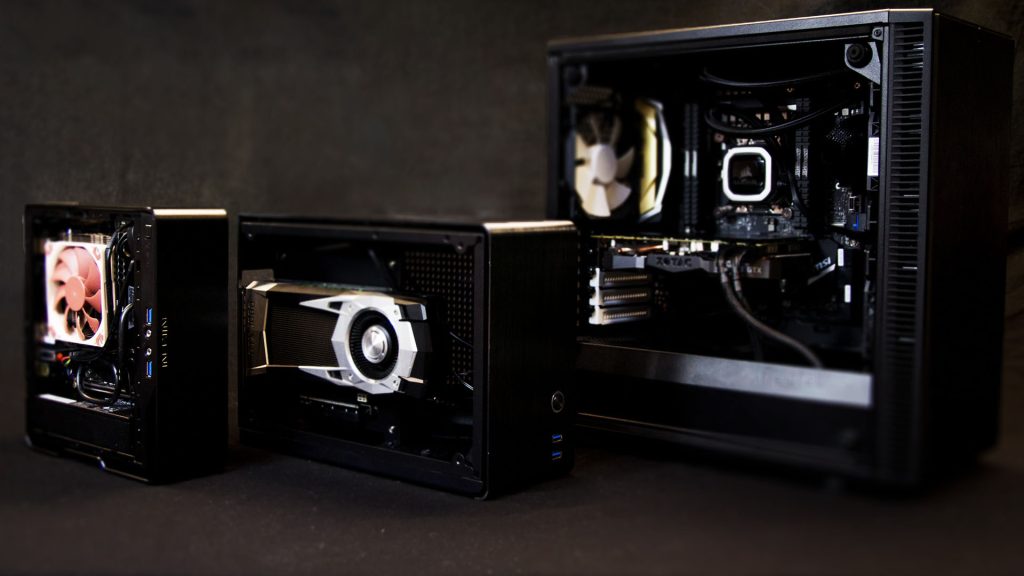
Mini PCs are becoming increasingly popular as people look for ways to save space and money. A mini PC can be a great option for those who want the power of a desktop computer without all the bulk. But how do you build a mini PC?

It’s actually not as difficult as you might think. With a few simple steps, you can put together a mini PC that will suit your needs and budget. Here are the basics of how to build a mini PC:

  1. Decide on the size and form factor of your mini PC. There are a few different options when it comes to mini PCs, so you’ll need to decide which one is right for you. The most common form factors are mini-ITX and micro-ATX. Mini-ITX boards are the smallest available, and micro-ATX boards are slightly larger. You’ll also need to decide on the size of your mini PC case. There are a few different sizes available, so you’ll want to measure your space before making a decision.
  2. Choose the components for your mini PC. Once you’ve decided on the size and form factor of your mini PC, you’ll need to choose the components that will go inside it. The most important component is the motherboard. You’ll also need a CPU, a GPU, memory, storage, and a power supply. You can either buy these components separately or get a mini PC kit that comes with everything you need.
  3. Assemble your mini PC. Once you have all the components, it’s time to put everything together. This is actually the easy part, as most mini PC cases come with clear instructions on how to assemble everything. If you’re not sure how to do something, there are plenty of resources online that can help.
  4. Install your operating system. The final step is to install an operating system on your mini PC. This is actually quite easy to do, and there are a few different options available. Windows 10 is the most popular choice, but you can also install Linux if you prefer. If you’re not sure which operating system to choose, there are plenty of resources online that can help you make a decision.

If you are not confident in your abilities to build a mini PC, there are plenty of pre-built options available. You can find mini PCs that come with all the components you need and are ready to use right out of the box. You can also ask mini PC builders to put together a custom mini PC for you, based on your specific needs and budget.

How much does it cost to build a mini PC?

The cost of building a mini PC will vary depending on the components you choose. However, you can expect to spend anywhere from $200 to $500 on a basic mini PC. If you want a more powerful mini PC, you can expect to spend closer to $1000. Aside from the cost of the components, you’ll also need to factor in the cost of an operating system and any other software you might want to install.

Putting up a pharmacy is a great way to provide convenient care for your community and make a profit while doing it. A pharmacy can be a valuable asset to your town or city. Aside from generating jobs, it can help keep people healthy and provide a needed service. 

If you want to put up a pharmacy, there are certain things that you need to do in order to make sure that it is successful.

Here are some tips on how to put up a pharmacy:

  • Conduct a feasible study. This is important because you need to make sure that there is a market for your products and services. You also need to determine the location of your pharmacy.
  • Find a location. This is usually a commercial area where there is a lot of foot traffic. Your location should also be accessible to your target market. Aside from that, you also need to make sure that your location is safe and secure.
  • Get the necessary permits and licenses. This is important so that you can operate legally. Here are the most common permits and licenses that you need to get:
  • Business permit- This is issued by the local government where your pharmacy will be located.
  • Pharmacy license- This is issued by the Department of Health and it is required in order to sell medications.
  • Drug permitThis is also issued by the Department of Health and it is required in order to sell over-the-counter drugs.
  • Find a supplier. This is important so that you will have a steady supply of medicines and other products. You can find suppliers through the internet or through your local Chamber of Commerce.
  • Hire employees. This is important so that you can have a team to help you run your pharmacy. You should hire people who are knowledgeable about the products that you sell and who are friendly and customer-oriented. Make sure that you have a licensed pharmacist on your team.
  • Purchase insurance. This is important in case of an accident or liability claim. When you have an insurance policy, you can be sure that you will be covered financially in case something happens.
  • Set up your store. This includes arranging your products and displays, as well as setting up your cash register, computer system, and pharmacy credit card processing, among others. Make sure that your pharmacy is ready and inviting for customers. 
  • Promote your business. This is important so that people will know about your pharmacy. You can promote your business through print, radio, or television ads, or you can distribute flyers in the area where your store is located.

These are some tips on how to put up a pharmacy. If you still want to learn more, you can read books or articles about setting up a business, or you can consult with a business consultant. With proper planning and execution, you can be sure that your pharmacy will be successful.


Running a business of any size can be a challenge, but operating a small business with limited resources can be a Herculean task. Even though small business owners are often among the most satisfied workers, they have to juggle an endless amount of tasks to get there.

One area you won’t want to overlook as a small business owner? Cybersecurity. A serious data breach could be enough to sink your company or turn your current clientele against you. It’s important that you understand how to use tools like data erasure software in order to protect your business.

What is data erasure, and why is it so important to understand in business? What do you need to know about data deletion? Read on, and we’ll walk you through the basics.

Why Data Erasure?

Data is an extremely valuable and sensitive asset for any business. Your customer’s data is what allows you to operate and allows them to continue to shop with you while maintaining peace of mind.

Internal data might cover everything from your business secrets to your bank accounts and is certainly something you wouldn’t want getting into the wrong hands.

There are several steps companies take to protect all of this data, but sometimes, a clean slate is needed to truly ensure that no single piece of data ends up in the wrong hands.

There are many reasons that complete data erasure might be needed. A now-defunct piece of equipment or server may need to be cleared safely before it is retired. A reset in company focus, strategy, or actions might require a clean slate across various IT platforms.

No matter what the situation is, you’ll need to ensure that this process of data erasure is done securely and completely. A mistake during this process can lead to much bigger security concerns later on.

What is Data Erasure Software?

How can you be sure that this process will run as smoothly as it can? Doing all your deletion work by hand isn’t likely the path. Manual deletion is a time-consuming process and one that is all-too-likely to lead to mistakes or accidental oversights.

You need the assured and clinical hand of a stellar piece of software to ensure no remaining data is left in areas that you need to be wiped.

Data erasure software, such as the options available at Certus Software, has been specifically designed to perform this kind of task. These software options have been programmed to leave no stone unturned when it comes to the job of complete data erasure.

An investment in this kind of tech is really an investment in your own peace of mind. It’s an investment in the safety of your business and your clients and one that any entrepreneur will need to consider.

Learning How to Erase Data

Looking to protect your assets and the overall health of your business? You’ll want to be as well versed in data erasure software as you can be. The above information can help you to understand the value and importance of this kind of tech.

Need more tech tips and advice? Keep scrolling our blog for more.